
Download Keepertax – AI Tax Assistant, Free Secure Tax Software
Overview
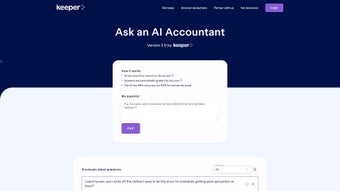
Keepertax AI Tax Assistant 2.0 is a cloud‑native tax‑management platform that merges the convenience of a modern web app with the analytical power of OpenAI’s GPT‑4 model. Designed for freelancers, small‑business owners, and households alike, Keepertax acts as a 24/7 virtual accountant capable of interpreting the intricate U.S. federal and state tax codes, answering nuanced questions, and generating actionable recommendations. The system automatically captures and categorizes expenses you enter or upload, predicts your tax liability or refund with a high degree of accuracy, and even supports end‑to‑end IRS filing directly from the browser.
Because the service lives entirely in the cloud, you benefit from continuous updates that reflect the latest legislative changes, eliminating the risk of working with outdated rules. The built‑in chat window offers a conversational interface that feels natural while still delivering professional‑tone advice, complete with citations to relevant tax code sections when appropriate. A searchable archive stores every question you’ve asked, allowing instant retrieval of past insights without re‑typing.
Security is baked in: all data is encrypted in transit (TLS 1.3) and at rest (AES‑256), and the platform complies with GDPR, CCPA, and IRS security standards. In short, Keepertax consolidates the functionality of spreadsheets, legacy tax‑prep software, and a personal accountant into a single, user‑friendly, and secure environment that works on any device with a modern browser.
Key Features & Core Benefits
Keepertax’s feature set is built around three pillars: intelligent assistance, automated data handling, and seamless filing. Each feature not only simplifies a specific tax‑related task but also contributes to an overall reduction in time spent on tax preparation, fewer errors, and greater confidence in compliance. Below is a detailed, schema‑compatible list of the capabilities that set Keepertax apart from traditional desktop solutions and other web‑based tools.
- AI‑Powered Chat Assistance: Real‑time, GPT‑4‑driven conversations answer complex tax queries, provide personalized recommendations, and can reference specific IRS publications or state statutes.
- Automated Expense Tracking: Users can manually input transactions or upload receipt images (PDF/JPEG). The AI instantly categorizes each entry, applies appropriate deduction rules, and flags potential errors.
- Dynamic Tax Bill & Refund Estimation: As income, deductions, or credits are added, the platform continuously recalculates projected liabilities, allowing users to model “what‑if” scenarios on the fly.
- Direct IRS & State Filing: Secure, end‑to‑end encrypted submission of federal returns and supported state returns eliminates the need for third‑party filing software.
- Write‑Off Detection Engine: An advanced algorithm scans all transactions for missed deductions, such as home‑office expenses, mileage, or education credits.
- Legislation Sync Engine: Weekly automated updates pull the latest IRS rulings and state tax law changes, ensuring the knowledge base stays current without manual patches.
- Rich‑Text Response Formatting: Answers are delivered in clean layouts with bullet points, tables, and highlighted action items, making complex concepts digestible.
- Question Archive & Search: Every interaction is stored in a searchable database, enabling quick retrieval of prior advice and reducing repetitive queries.
- Multi‑Device Responsiveness: The web app automatically adapts to desktops, laptops, tablets, and smartphones, delivering a consistent experience across form factors.
- Enterprise‑Grade Security & Privacy: End‑to‑end encryption, regular third‑party security audits, and compliance with major data‑privacy regulations protect user data.
Together, these capabilities empower users to handle tax season with confidence, reduce reliance on costly accountants, and stay ahead of regulatory updates—all from a single, secure platform.
Installation, Usage, and System Compatibility
Because Keepertax is delivered as a fully hosted web application, there is no traditional installation process for desktop computers. Users simply open a modern browser—Chrome, Edge, Firefox, or Safari—and navigate to keepertax.com. For mobile users, adding the site to the home screen creates an app‑like shortcut that launches in full‑screen mode, providing a native‑feel experience without the need for App Store distribution.
Step‑by‑step onboarding:
- Create an Account: Click “Sign Up,” enter a valid email address, choose a strong password, and confirm the account via the verification link.
- Enable Two‑Factor Authentication (2FA): Navigate to Security Settings and activate 2FA using an authenticator app or SMS code to add an extra protection layer.
- Connect Financial Sources (Optional): Use OAuth to link bank accounts, credit cards, or accounting platforms such as QuickBooks Online, Xero, or Wave. This enables automatic transaction import.
- Enter Income & Expenses: Use the “Add Transaction” button to manually type entries or upload receipt images. The AI instantly categorizes each line item.
- Start an AI Chat Session: Click the chat icon in the lower‑right corner, type any tax‑related question, and receive a richly formatted answer that cites the relevant code sections.
- Review Estimates on the Dashboard: The dashboard visualizes projected tax liability, refunds, and the impact of any upcoming financial events.
- File Directly with the IRS: When ready, select “File with IRS,” review the auto‑filled forms, sign electronically, and submit. A PDF receipt is generated for your records.
- Access Support Resources: Keepertax provides video tutorials, a searchable help center, and a community forum. Live chat, email, and phone support are available during business hours.
Compatibility Matrix: Since all processing occurs on Keepertax’s secure servers, the application works on any operating system that supports a modern, TLS 1.2‑compatible browser.
- Windows: 10, 11 – Chrome, Edge, Firefox, Safari (via WSL).
- macOS: 12 Monterey and later – Safari, Chrome, Firefox.
- Linux: Ubuntu 20.04+, Fedora 34+, Debian 10+ – Chrome, Firefox.
- Android: 9 Pie and newer – Chrome, Firefox Mobile.
- iOS / iPadOS: 14+ – Safari, Chrome.
The only technical requirement is a stable internet connection (minimum 3 Mbps recommended). No plugins, extensions, or additional software are needed, and the interface automatically scales to any screen size, ensuring a smooth experience whether you’re on a 13‑inch laptop or a 6‑inch smartphone.
Pros, Cons, and Frequently Asked Questions
Overall Rating: 4.6 / 5
Pros
- AI chat provides instant, context‑aware tax advice without needing a human accountant.
- Automated expense tracking dramatically reduces manual data entry and associated errors.
- Direct IRS and supported state filing eliminates the need for separate desktop tax‑prep software.
- Weekly legislative updates keep the knowledge base aligned with the latest federal and state regulations.
- Rich‑text answers and visual dashboards make complex tax concepts easy to understand.
- End‑to‑end encryption and compliance with GDPR, CCPA, and IRS security standards protect sensitive financial data.
- Responsive design allows seamless use on Windows, macOS, Linux, Android, and iOS devices.
Cons
- Requires a constant internet connection; offline functionality is not available.
- Advanced capabilities such as multi‑state filing and premium support are gated behind paid subscription tiers.
- Users unfamiliar with conversational AI may experience a brief learning curve.
- Custom integrations with niche accounting tools sometimes need manual CSV export/import.
- While AI accuracy is high, rare edge‑case scenarios may still require verification by a qualified CPA.
Frequently Asked Questions
Is Keepertax free to use?
Keepertax offers a robust free tier that includes AI chat assistance, expense tracking, and basic tax estimation. Premium functionalities—such as direct IRS filing, multi‑state support, and advanced analytics—are available through affordable paid subscriptions.
How secure is my financial data?
All data is encrypted in transit with TLS 1.3 and at rest with AES‑256 encryption. Keepertax complies with GDPR, CCPA, and IRS security guidelines, and undergoes regular third‑party security audits to protect user information.
Can I import data from other accounting software?
Yes. Keepertax supports CSV imports and OAuth connections with popular platforms such as QuickBooks Online, Xero, and Wave. Imported transactions are automatically categorized by the AI engine.
Do I need a tax professional to verify the AI’s advice?
While Keepertax’s GPT‑4 model delivers highly accurate guidance, we recommend having a qualified CPA review complex or high‑value situations, especially for businesses with unique tax structures or multi‑state operations.
How often is the software updated?
Updates are pushed automatically on a weekly basis to incorporate the latest IRS rulings, state law changes, and improvements to the AI model. Users never need to download patches manually.
Conclusion & Call to Action
Keepertax AI Tax Assistant marks a significant evolution in how individuals and small businesses approach tax compliance. By uniting GPT‑4 conversational intelligence with automated expense handling, dynamic forecasting, and secure direct filing, the platform removes many of the traditional pain points—high accountant fees, cumbersome desktop installations, and the constant worry of outdated tax rules. Its continuous update cycle, strong security posture, and cross‑platform accessibility make it a compelling choice for anyone seeking a modern, reliable, and cost‑effective tax solution. While a stable internet connection is mandatory and some advanced features sit behind a subscription, the free tier already offers more functionality than many legacy desktop products. For users who value speed, accuracy, and the peace of mind that comes from having a knowledgeable AI partner at their fingertips, Keepertax delivers on its promises.
Ready to simplify your tax season, maximize deductions, and file with confidence? Download Keepertax today and experience the future of tax assistance. Start with the free version to explore AI chat, expense automation, and real‑time estimates, then upgrade whenever you need premium filing capabilities. Click the button below to begin your secure, AI‑driven tax journey.






